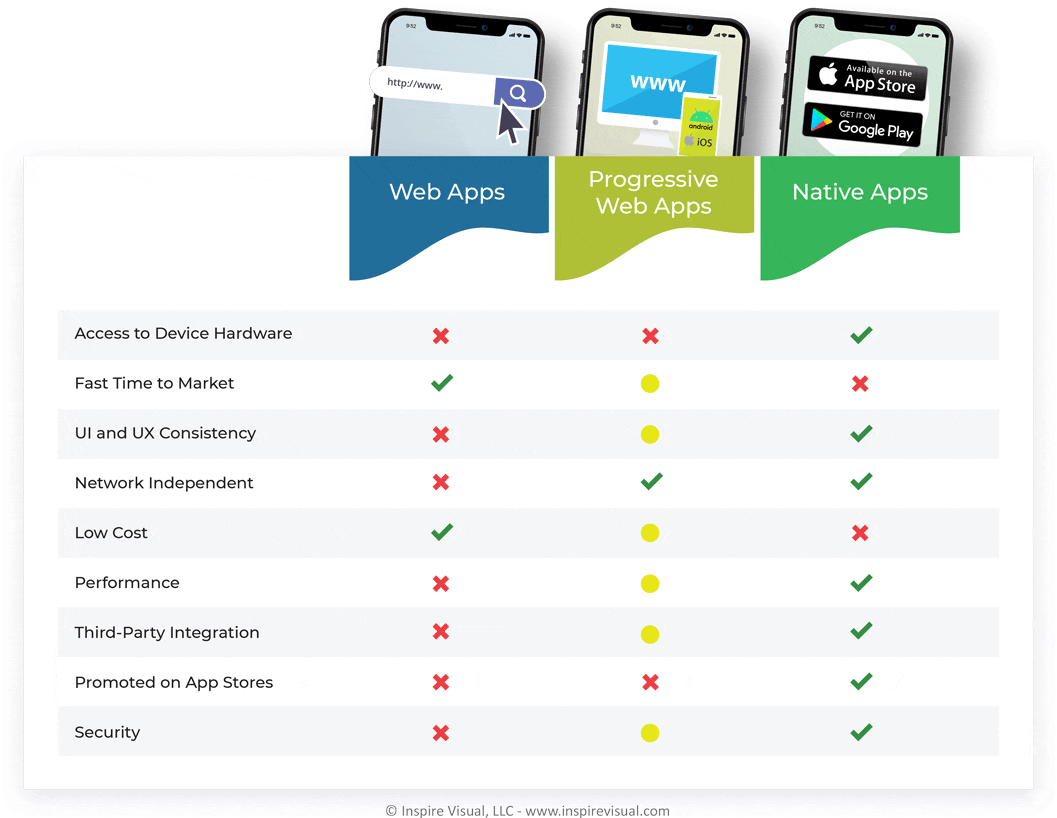
Web apps are just mobile responsive websites. They are dependent on being accessed through a browser and therefore are limited by the browser’s capabilities.
Since web apps work via a web browser on the smartphone, they require a cell signal or wi-fi to function properly. There is also tight security on access to the mobile hardware.
This means web apps don’t have access to certain features, many of which can drive customer engagement and conversion, like offline support, push notifications, Bluetooth, smart assistants (Bixby and Siri integration) and other native-like features that users have come to expect.
Due to the lack of mobile hardware access, data presented in the app must be fed in by back-end APIs; for example, store fronts rely on back-end servers to feed images, text and the payment gateway.
PROS
Easier to maintain
Cross-platform compatibility and wide browser support
No approval process from app store owners
CONS
Dependent on network connection and does not work offline
Not promoted on app stores and harder to find
Very limited access to mobile devices’ native features
Progressive Web App (PWA)
Progressive Web Apps are a cross between a mobile website and a native app, allowing them to take advantage of both web and native app features. Another commonly used name for these are Hybrid Apps. They are built with HTML, CSS and JavaScript, but are more advanced than their Web App counterparts.
A great feature PWAs have that web apps don’t is the ability to add the app to the home screen. They run in the browser, but once saved to the home screen, they function much like a native app.
That means PWAs have access to the native hardware like the camera, microphone, photo library and GPS location, basically features the browser would not be allowed to access for security reasons.
Another great benefit is that app developers can push updates to PWAs, much like a native app.
There are limitations on PWAs being able to access hardware features depending on whether the app is Android or iOS, but these are not as strict as as they are for web apps.
For example, support for camera features is only partly supported on iOS. Another example is Push notifications – they work great on Android, but are not supported on iOS.
Google is pushing for PWA support on Android and features are widely supported. Apple has always been a more closed system in part due to security, so features are much more limited on iOS.
Third-party browsers on mobile platforms, such as Firefox and Edge, also have their limitations.
PROS
Quicker development time than native app
Cross-platform compatibility
Lightweight for a smooth experience
Works offline and not dependent on network connection
CONS
Limited support for native features
Many browsers to target and no uniform support for all
No presence in app stores therefore lower traffic
No access to advanced features such as Bluetooth and NFCs
Here’s a site that provides in-depth information about what is and isn’t supported in PWAs.
Native Apps
A native mobile app is installed directly on the smartphone and can work with no internet connectivity, although how much content can be accessed offline may be limited and is dependent on how the app is built.
Native apps are the ones you know from Google’s Play store and Apple’s App store. With over 4.35 million apps in their combined library, they are by far the most popular option of the three types of apps we’ll discuss.
There are several ways to make native apps: either by targeting the platform itself (Android or iOS) or by developing a cross-platform solution that works on both using one codebase.
These apps have full access to native features on the mobile or tablet they are installed on. To gain this trust from Google and Apple, all native apps have to go through a review process before being published. This is a short process that typically only takes about a week.
PROS
Best UI experience since they have to conform to Google and/or Apple’s guidelines
Better security with two-factor authentication, TouchID and a closed system
Best performance of all three development options resulting in higher user satisfaction
Not dependent on a network connection, so they work offline
Access to all hardware features on devices
Published in app stores with access to a large audience
CONS
Upfront costs are higher than the two other alternatives
More complex for developers to build, so they take longer to build
Less potential revenue if based on an in-app payment model, since both Google and Apple take a 30% commission
LET’S TALK ABOUT YOUR APP
Do you want an app and have questions? We can help!
In the earlier days of app development, apps used to be built with a codebase for each platform. Essentially, you would build an app for Android and another app for iOS in their native SDK’s (software development kits).
Those days are mostly gone with the introduction of strong cross-platform development kits, so is there still a reason to develop a single-platform native app?
Oftentimes the answer is no; however, below we explain some advantages that still make single-platform native app development desirable.
Differences Between Single-Platform vs Cross-Platform Native Apps
The differences are becoming less noticeable with powerful cross-platform development kits maturing, but there are times you might want to consider developing a single-platform native app.
Here are some pros and cons of building an app for only one platform:
PROS
Code optimization is at its best in a single-platform app. These apps are faster and more responsive, since they are developed using the platform’s core programming language and libraries. This makes the processing time faster than if the app has to translate another programming language (like a cross-platform app does).
UI/UX are made specifically for the chosen platform. Google offers their Material Design and Apple their Human Interface Guidelines; the design principles are clearly defined and are not identical. Designing for each platform gives the user the most intuitive experience, the app will seem like an integrated part of the platform itself.
New features are released immediately to the manufacturer’s own SDK first. So, if it’s important to get access to these features on every new Android and iOS version release, you can’t get it any faster than you can with native.
CONS
Cost increase is likely if you want your app available on both the Android and iOS devices, since two code-bases will have to be developed instead of utilizing one shared codebase.
Development time takes longer. Developing two separate code-bases requires two different teams (or at least different app programmers) working on their version of the app. The complexity of coordinating two teams instead of one will also add to the timeline.
Maintenance is more difficult. When a new feature is introduced, it will have to be implemented on two codebases, not just one.
When it comes to building the best performing, best UI/UX interface and most new feature compatible app, single platform is the obvious choice.
But as you will learn in chapter 3, there are also great cross-platform SDKs available that now have almost all of the advantages that fully native apps have (with few of the disadvantages remaining).
LET’S TALK ABOUT YOUR APP
Do you want an app and have questions? We can help!
Cross-platform mobile app development allows you to build just one code-base for Android and iOS instead of building a code-base for each and essentially doubling the work.
This option saves on development cost and time if your goal is to release your app on both Google’s Play store and Apple’s App Store. It also makes for a unified UI/UX experience coming from Android to iOS and vice versa as the interface will be identical.
There are too many options to count if we were to list all app development kits, so let’s focus on the three most popular development kits today.
Flutter
The open-source mobile app development kit was created by Google in 2017. It is the newest of the three most popular app development kits, but has become widely popular due to its ability to output high-quality apps.
Its programming language is called DART; built from the ground-up with focus on a seamless UI experience between Android and iOS as well as optimized and fast code output.
While being difficult to compete with truly native built apps in terms of speed and smooth performance, Flutter is shining among the cross-platform options and a worthy candidate.
PROS
Hot Reload allows for live view of the app while programming. Any code changes will reflect immediately and helps speed up the app development as features and bugs will show instantly.
Less testing since the codebase is shared between Android and iOS. You will save on cost by not having to test two different app codebases with the risk of different kinds of bugs on each. Note that you will have to test on both platforms, but fixing a bug on one platform is likely to fix it on the other platform as well.
Support from a powerful company and over 500,000 developers use Flutter monthly. This makes for a very active development community. The development kit gets regular updates with new features and offers well-written documentation.
Scaling makes it possible to develop for Android and iOS and later expand to desktop and web apps.
CONS
No direct API calling. Instead it has to go through either a plug-in or be written natively for each platform.
Limited tools and libraries due to its young age. Libraries save development time by being able to use already built functionality for specific features.
React Native is another big player on the mobile app development market. It was created by Facebook in 2015 and was made to be a replacement of building Facebook in HTML.
Once it was available for public use, it quickly became widely popular as a cross-platform development kit.
The programming language used is JavaScript and its framework are compatible with a large library of 3rd party plug-ins.
PROS
Hot Reload is supported by React Native allowing for developers to apply changes instantly without having to recompile the app.
The user interface implements native UI components. This makes for a uniform UI experience, it will look consistent.
Option to target native functionality on each device to take advantage of each platform’s full potential.
A large supportive community with a lot of know-how from seasoned JavaScript developers.
Plenty of tools and libraries makes for a quicker development cycle.
CONS
The user interface does not support complex transitions and animations.
Some features are not supported and will have to be natively programmed for each platform.
Slightly slower applications when comparing Flutter and Kotlin. This can happen if complex platform specific code needs to communicate with the JavaScript part of your app.
Kotlin Multiplatform is JetBrains’ cross-platform mobile development kit, and it’s the newest of the three frameworks.
Unlike “write once, run anywhere” tools, Kotlin Multiplatform focuses on sharing business logic across iOS and Android while keeping native UI,and with Compose Multiplatform you can optionally share UI too.
It delivers near-native performance because shared code compiles to real native binaries, and teams can adopt it gradually inside existing Android or iOS apps.
Kotlin Multiplatform was first announced by JetBrains in 2011, open-sourced under Apache 2.0, and is now Google’s preferred language for Android development.
PROS
Native-level performance with shared logic compiled to native targets.
Best-in-class Android experience and strong interoperability with Swift/Objective-C on iOS.
Incremental adoption: you can share just networking/data/domain layers without rewriting UIs.
Free, open-source core stack, with optional paid IDE upgrades.
CONS
More architectural work up front than Flutter/React Native (you manage shared modules + two UIs unless using Compose).
Ecosystem is newer and smaller, so some libraries/tools require workarounds or platform-specific code.
iOS tooling/debugging can feel less polished than pure-native Swift projects, though JetBrains is improving this quickly.
Recommending one app development method over another is difficult, since it really depends on the needs of your app. For example, social apps packed with features will have different requirements than a gaming or financial app.
Generally, both Flutter and React Native are well established tools, but with Kotlin slowly gaining ground.
While Kotlin’s parent company, JetBrians has been around for a long time, they remain taking up a smaller share of cross-platform app development than Google and Facebook, and it seems their focus on their app development kit is not as strong as Facebook and Google’s.
We hope this article has given you a good overview of the technologies available today.
If you still need more clarity in what app technology would work best in your new app, or you are ready to pursue your app adventure, Inspire Visual would love to help.
Contact us to learn what we can do for you. We have a solid portfolio and can make the journey effortless.
At Inspire Visual, we believe that compelling design, functionality and content help drive effective results. That’s why we work hard to provide innovative, visually inspiring and functionally sound solutions to address your marketing challenges and extend your brand’s reach.
We offer decades of experience helping brands worldwide with websites, mobile app development, email marketing, direct mail campaigns, brand identity design, UI/UX, graphic design, print design, tradeshow design and more. We feel privileged to be allowed into our clients’ businesses, and we strive to provide personal service and close collaboration throughout your project.
Call 407.434.9171 or email [email protected] to contact us, so we can meet you, learn more about your business and answer any questions you have. We’d love to connect with you!
App tracking is used by data broker and marketing technology companies to collect, analyze, and sell detailed consumer data for targeted advertising. They record what you and everyone else is doing online to build comprehensive profiles of purchasing habits, demographics, and contact info, allowing brands to deliver personalized, cross-channel marketing.
Apple and Google share track and share your data unless you disable it. Fortunately it's not difficult to improve your online privacy settings right now whether you use an Android or iPhone.
Many people today are struggling to make ends meet, with rising prices on everything from groceries to gas. It’s becoming harder to stretch each paycheck, and unexpected expenses can quickly throw off a budget. Saving money has never been more important, not just for long-term goals but for everyday stability and peace of mind.
Fortunately, you can save a lot of money with the help of these great deal-saving apps. We have listed the 5 best apps for Android and iOS that will help you get much further with less.
Are you ready to talk about your project?
Hello, I’m Angela, co-founder of Inspire Visual! Let’s have a chat about your project. Send an email or fill out the form to get started. Talk soon!