Apple’s App Store, with its 1.54 million mobile apps, has something for everyone. Since 2007, it has been the only place for iOS developers to showcase their apps, unless the iPhone or iPad was jailbroken. However, most people avoid jailbreaking their devices due to security risks, complexity, and limitations.
In an effort to reduce the power of large tech platforms, the European Union introduced the Digital Markets Act (DMA) in 2023. Apple’s CEO, Tim Apple (sorry, Cook), was probably not too excited about this, but for everyone else it was great news. The law forced Apple to allow iPhone and iPad users to download and install iOS apps from alternative iOS app stores.
Since iOS 17.6 and iPadOS 18, EU and Japanese Apple users have been able to install apps from third-party app stores. Not an EU/Japanese citizen? It takes some extra steps, but with some effort, you can also access these alternative stores. We’ll explain how below.
First, let’s explore some of the most notable and popular alternative iOS app stores, along with what makes them unique and worth considering.
Until now, us Apple users could only look enviously at Android users and their Android app store alternatives, wishing we had the same ability to install apps not approved by Apple. You may wonder why anyone would want to do that (or not, since you are here). Well, Apple has strict guidelines that prevent certain app categories from appearing in the official App Store – especially utility apps such as network scanners, emulators, and ad blockers. These categories are often blocked because they don’t align with Apple’s policies.
Apple has enjoyed tremendous benefits from maintaining a monopoly on its app store. The upside for users has been the convenience of a preinstalled App Store, providing easy access to apps right out of the box.
Where are alternate app stores available?
Apple alternative app stores and third-party app distribution are currently available specifically for users in the European Union (EU) and Japan. The official requirements from Apple to use these stores is that your Apple Account region must be set to one of these locations, you must be physically located there, and your device must be running the latest iOS version.
Currently an EU exclusive, developers can even offer apps directly from their websites, bypassing both the App Store and alternative marketplaces.
It means cheaper and better iOS apps for you
For iOS app developers and users, the downside has been the difficulty of finding niche apps and the so-called “Apple tax”, a 30% fee on in-app purchases. Additionally, the App Store’s charts are often dominated by apps backed by multi-million-dollar marketing budgets. For iPhone and iPad users, this makes it challenging to discover niche apps amid the clutter of TikTok, YouTube, Roblox, and Minecraft hogging the top spots.
It’s not just iOS users who have faced challenges. Developers also struggle to get noticed in Apple’s App Store. Success requires extensive App Store Optimization (ASO), which often means hiring an iOS app development agency. For indie developers, third-party iOS app stores provide a way to reach their audience without having to invest heavily in ASO and big marketing budgets.
Third-party iOS app stores are still few and far between
Since Apple only recently opened up to third-party app stores, they can be difficult to find. There simply aren’t many alternative iOS app stores available yet. Fortunately, we did the work for you and found the best iOS marketplaces currently worth exploring.
We are iOS app developers ourselves
When developing iOS apps for our clients, we provide guidance on which app stores will be most beneficial for their specific app. While the official App Store remains essential, there’s no reason to overlook niche target groups on alternative app stores. iOS users who visit unofficial app stores do so to discover hidden gems.
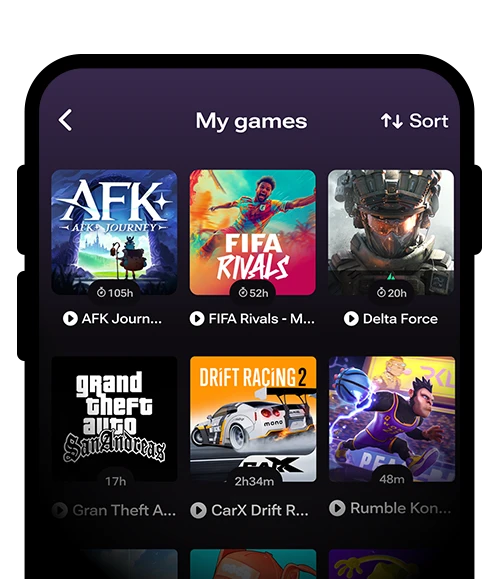
For example, we recommend AltStore PAL for game developers and players, as it allows games and emulators without requiring developers and players to hand over 30% of in-app revenue to Apple. This means developers earn more, and players save money.
Sharing our knowledge as an iOS app development agency
At Inspire Visual, we have extensive experience with the largest iOS app stores and can recommend the best platforms to maximize app visibility and downloads. We figured we might as well share this knowledge with you, along with direct links to the most popular app marketplaces available right now.
The EU’s antitrust ruling is great news for everyone, except Apple’s monopoly. Check out the list below to see which alternative app stores you can start using today.
Epic Games launched the Epic Games Store in 2018 on Windows and macOS, following the success of Fortnite and as a direct competitor to Steam, currently the world’s largest digital distribution platform, developed by Valve Corporation.
In August 2024, Epic Games expanded its store to include Android and iOS apps. While we can only speculate, a likely motivation was Fortnite’s removal from the official iOS App Store in 2020, after Epic Games violated Apple’s terms of service by implementing its own in-app payment system to bypass Apple’s 30% commission on paid apps.
Epic Games is the second largest iOS store
The Epic Games Store is now the second-largest app and game marketplace, boasting 270 million users across Windows, macOS, Android, and iOS devices. While its catalog primarily caters to PC users, it offers over 2,900 titles and continues to expand. Epic has also announced the arrival of free iOS games, including Bloons TD 6 and Dungeon of the Endless: Apogee.
While this store is exclusively for games, it’s a must-have if you want to play Fortnite on your iPhone or iPad. Beyond Fortnite, the Epic Games Store offers a growing selection of free games, exclusives, and popular iOS titles, expanding an already impressive 2,900+ game library.
Safety Assessment: No known risk Based on: Epic is a large reputable company and officially authorized under the Digital Markets Act.
Don’t just take our word for it. Use at your own risk. Third-party app stores can carry higher malware risk than the official App Store, so verify the sources and make your own assessments.
We’re including the Aptoide iOS app store, even though it’s currently available only as a closed launch. Access is granted on a case-by-case basis, but it appears that most users are approved. Simply register your email on their Download page, and you’ll receive a code via email, allowing you to start using this alternative iOS app store.
Aptoide, based in Portugal, was originally created in 2009 as a summer project for Android devices. However, it quickly gained popularity and became a registered business. In 2024, Aptoide expanded its offerings to include an iOS app store.
How Aptoide differs from other app stores
Unlike the official App Store and most third-party alternatives, Aptoide is decentralized. Rather than operating as a single, centralized store, Aptoide allows individuals to run their own iOS app stores.
However, this decentralized structure makes no difference to you as a user, you can still search Aptoide’s entire app library through the search bar on both their website and Aptoide app.
A large catalog across multiple devices
In addition to offering apps for iOS and Android, Aptoide provides apps for tablets, SmartTVs, STBs, VR devices, and even devices designed specifically for children.
With over 430,000 daily visitors, Aptoide boasts a catalog of more than one million apps. While the iOS selection is still a small part of this massive library, it continues to grow with new apps added daily.
More relaxed content policies
Aptoide has more relaxed content regulations than other alternative app stores, making it a go-to place for apps not available elsewhere. This includes piracy apps, as well as older versions of apps—which some users prefer when newer updates remove features or introduce unwanted changes (such as ads or mandatory sign-ups).
No account required—except for iOS
One of Aptoide’s conveniences is that you don’t need an account to download apps. However, for now, the iOS version requires signing up due to its closed-launch phase. If you don’t mind being an early adopter, go ahead and register—but if you’d rather wait, Aptoide will likely remove the email requirement once the store is open to everyone.
Growing selection of iOS apps
The Aptoide iOS marketplace currently has a limited selection but includes indie titles such as A Cat’s Tale, Squadblast, and Trivial Drive. The platform plans to expand its library weekly, focusing on freemium games with in-app purchases and rewards.
Safety Assessment: No known risk Based on: The Aptoide alternate iOS app store is considered relatively safe due to Apple’s required oversight for alternative marketplaces. Aptoide employs malware detection and uses “trusted” badges.
Don’t just take our word for it. Use at your own risk. Third-party app stores can carry higher malware risk than the official App Store, so verify the sources and make your own assessments.
The original AltStore was launched by Texas native and indie app developer Riley Testut in 2019. To install apps on an iOS device, users had to jailbreak their iPhones, a process that only the most tech-savvy could perform.
That all changed when the EU forced Apple to allow third-party app marketplaces to prevent monopolization. Soon after, Riley released his alternative iOS app store, called AltStore PAL, in the summer of 2024. Jailbreaking is no longer required, and apps can now be installed directly onto iPhones and iPads.
The $2 signup fee is now waived
Originally, there was a $2 annual fee to use AltStore PAL, but after receiving a grant, the developer made the app marketplace free of charge. While the fee may be reintroduced once the grant expires, for now, you can enjoy a free iOS app marketplace.
Core apps featured in AltStore PAL
In addition to offering alternative apps that aren’t available on Apple’s official App Store, AltStore PAL features four core apps:
UTM SE: A virtual machine that allows you to run Windows and Linux OS on your iOS device.
iTorrent: A torrent client for sharing and downloading files over the internet.
qBitControl: An app for managing the desktop version of qBittorrent.
PeopleDrop: A dating platform that helps you find people nearby.
You’ll also find Delta, the developer’s pet project, an emulator that lets you play your favorite retro console games.
The iOS app catalog is still limited
While the app selection is currently small, it’s expected to grow over time. While it’s currently available in the EU, it has planned launches in Japan, Brazil, Australia, and the UK which will moste likely add to the app catalog.
Recently, AltStore PAL announced the arrival of Epic Games, bringing popular titles like Fortnite, Rocket League, and Fall Guys to iOS devices.
Apple still performs a notarization check for security and malware on these apps, but AltStore PAL sets its own content rules and business mode and promises that all listed apps are reviewed to meet security standards.
If you’d like to install AltStore PAL on your iPhone or iPad, you can do so here.
Safety Assessment: No known risk Based on: AltStore’s alternate iOS app store is generally considered safe to install and use. It is also officially authorized under the Digital Markets Act.
Don’t just take our word for it. Use at your own risk. Third-party app stores can carry higher malware risk than the official App Store, so verify the sources and make your own assessments.
This alternative iOS app marketplace launched in China in 2016 and has since become particularly favored for providing modified versions of popular apps and games, often with additional features and unlocked (free) content.
Be aware of unofficial apps
If you use this store, be aware that some apps may not be endorsed or approved by their original developers. TutuApp is an unofficial app store, so some of the apps available might not be authorized by the original developers.
TutuApp has an extensive library with several thousand apps and games. The exact number can vary as new apps are added or removed daily.
Choose between VIP and free versions
TutuApp offers both a VIP version and a free version. The free version relies on enterprise certificates, which are available for download when they can be found on the market. However, these certificates may be revoked by Apple at any time, meaning you’ll have to wait for new certificates to become available before you can continue using the free version.
Alternatively, you can opt for the VIP version, which uses more stable certificates. If the VIP certificate is revoked, TutuApp will provide you with a new certificate.
Rich functionality, but with risk
Due to its unofficial nature and the wide range of third-party apps it offers, it’s always a good idea to be cautious when downloading and using iOS apps, especially regarding privacy and security. TutuApp is considered a gray-market app store, meaning it carries some risk, so be careful if you decide to use it.
VIP membership costs
The VIP membership costs:
$17.99 for one year
$26.99 for four years
$31.99 for a lifetime license
Please note that the membership is tied to one device only. If you later need it on another device, you will need to purchase a new VIP membership.
Safety Assessment: High risk Based on: The TutuApp alternate iOS app store offer a large library of tweaked and hacked apps not approved by the original developers. Since the apps are modified include malicious code.
Don’t just take our word for it. Use at your own risk. Third-party app stores can carry higher malware risk than the official App Store, so verify the sources and make your own assessments.
Mobivention App Marketplace is an EU-focused, business-first alternative iOS/iPadOS marketplace built primarily for company-controlled app distribution, not for general consumer browsing.
Made only for corporate internal use apps
It was created to help organizations deliver internal employee apps (and other restricted-use apps) that can’t, or shouldn’t, be published publicly on Apple’s App Store, while still using Apple’s approved marketplace framework introduced under the EU’s Digital Markets Act rules.
Apple approved for iPhone and iPad B2B distribution
What makes Mobivention different is its B2B distribution model: companies publish apps via Apple’s App Store Connect, Mobivention runs the review/check process based on Apple’s criteria, and then the marketplace is shared with a limited, intended user group (e.g., employees, partners, specific customers).
Apps in this alternative iOS apps marketplace are typically inventory & warehouse management, ordering tools, technician scheduling, safety audits etc.
At launch, Mobivention also emphasized that the marketplace offering starts with free apps, and it can be delivered as a white-label/customized marketplace (or even licensed) for larger organizations that want their own branded “internal app store” experience.
Safety Assessment: No known risk Based on: Mobivention is developed in cooperation with Apple serving as a secure, malware-free distribution channel for corporate, employee, and client apps.
Don’t just take our word for it. Use at your own risk. Third-party app stores can carry higher malware risk than the official App Store, so verify the sources and make your own assessments.
DO YOU LIKE THIS ARTICLE? Sign up to to be the first to receive more exciting articles. We don’t share your email, that’s a promise!
Skich was launched in March of 2025 and has its HQ on the small island of Cyprus.
The third-party iOS store focusing entirely on mobile games instead of trying to mirror Apple’s general-purpose catalog. It’s a gamers app store honeypot.
The Skich iOS app store launched in the EU with an unusual angle: at first there were essentially no games listed, but Skich had commitments from around 20 developers and planned a staged rollout to build its catalog quickly.
The iOS catalog is small but good
Today you can find more than 90 iOS app games in their catalog. Both free and paid gaming apps across 43 categories, 8 games modes, 22 themes, and 9 styles. They also offer Android app games with almost 7,000 Android games in that catalog. If you have an Android phone, don’t miss our list of Best Android App Store List Alternatives.
Skich’s iOS app catalog is still small, but with heavy hitters like Subnautica, Fortnite, Rainbow Six Mobile, Prince of Persia, and much more it is easy to find something fun to play.
The Skich app store will grow
App developers are always looking for more places to publish their apps, so game app developers will likely want their games on Skich as soon as they are published. The small 5% discount on app store listings is appreciated, with Skich charging app developers 15% of the revenue, compared to Apple’s 20% EU commission (Apple charge 30% in the US).
If you are a gamer or just looking to kill some time commuting in a plane, train or otherwise, head over to Skich and see if you can’t find a great game to play.
Safety Assessment: No known risk Based on: The alternate iOS app store, Skich, is a legitimate company operating under EU law.
Don’t just take our word for it. Use at your own risk. Third-party app stores can carry higher malware risk than the official App Store, so verify the sources and make your own assessments.
SideStore is an open-source, community-driven alternative to AltStore that lets you sideload .ipa files onto an iPhone/iPad using only your Apple ID, no jailbreak required.
It is built and hosted in Germany and highlight its focus on privacy by only collecting and storing data that is absolutely required to provide the service.
iOS apps are refreshed every 7-days
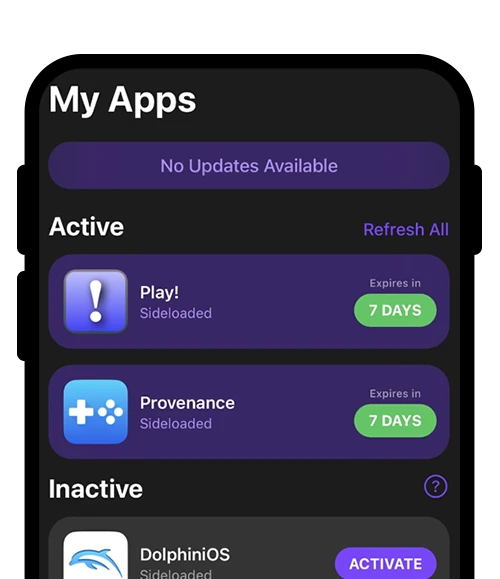
Its big differentiator is “untethered” installs and refreshes: you typically only need a computer for the initial setup, then SideStore can keep apps signed by periodically refreshing them so they don’t hit the usual 7-day expiration window.
An alternate iOS app marketplace for power users
Under the hood, SideStore re-signs apps with your personal development certificate and uses a local VPN-based method to enable on-device installs/refreshes (it’s designed to be local, no remote VPN traffic). It also supports “verified sources” (curated app lists you can add in-app), and it’s popular with power users who want things like an in-app JIT enabler for emulators and other performance-heavy apps.
Weekly limits on the active installed apps
Just keep Apple’s limits in mind: with a free Apple developer account, you’re generally capped at 3 active sideloaded apps (including SideStore) and 10 App IDs per week, constraints SideStore can’t remove on its own.
For developers, SideStore also offers SideStore Connect, a separate publishing option intended to help distribute apps through their ecosystem.
Safety Assessment: Small risk Based on: The alternate iOS app store, SideStore, is generally considered safe to use. It is an open-source and sandboxed project with transparent code. There is a small risk of the Apple ID being banned with excessive use. Using a burner Apple ID is a safe precaution.
Don’t just take our word for it. Use at your own risk. Third-party app stores can carry higher malware risk than the official App Store, so verify the sources and make your own assessments.
DO YOU LIKE THIS ARTICLE? Sign up to to be the first to receive more exciting articles. We don’t share your email, that’s a promise!
Outside EU/Japan: How to install alternative app marketplaces
If you’re in the EU/Japanese territory, please skip this section and move on to the section below titled “Inside the EU/Japan: How to Install Apps from Alternative iOS App Store Marketplaces.”
If you live outside the EU/Japan and want to sideload or install apps from alternative iOS app stores, follow these steps:
1. Subscribe to a VPN service
Subscribe to a VPN service such as NordVPN (they have a VPN app for iPhone and iPad you will use for the next steps)
In the VPN app, change your region to an EU country
Verify your VPN is working by checking that your IP location shows an EU country or Japan. Your can click here to check your VPN location.
2. Disable “Location Services” on your iPhone or iPad
Go to Settings
Tap Privacy & Security
Disable Location Services by clicking the toggle button
3. Change your Apple App Store region on iPhone or iPad
Go to Settings and select your Apple ID profile
Go to Media & Purchases, and View Account
Select Country/Region and Change Country or Region
Plug your iPhone or iPad into your computer, run 3uTools, click Toolbox, and click Virtual Location
Select a an EU territory, and click Modify virtual location.
Note: When you have downloaded your chosen app stores, you only need to restart your iPhone to revert back to your real GPS location again.
5. Install the alternative iOS app store
Continue to the steps in the next section If you are inside the EU/Japan: How to install apps from alternative iOS app store marketplaces
Disclaimer: We do not condone changing your region for illicit reasons or any other questionable activities. Please be sure to conform to all local laws and Apple’s terms of service.
LET’S TALK ABOUT YOUR APP
Do you want an app and have questions? We can help!
Inside the EU/Japan: How to install apps from alternative iOS app store marketplaces
In the European Union
Use a web browser on a device with the latest version of iOS or iPadOS to find an alternative app marketplace that you want to install.
Tap the link to install.
Read the information about what installing an alternative app marketplace means for your iPhone or iPad, then tap Allow.
Follow the onscreen steps to finish installing the app marketplace.
In Japan
Use a web browser on a device with the latest version of iOS or iPadOS to find an alternative app marketplace that you want to install.
Tap the link to install.
In the message that appears, tap Settings. Then tap Manage App Installation.
Tap Allow next to the app marketplace.
Read the information about what installing an alternative app marketplace means for your iPhone or iPad, then tap Allow.
Follow the onscreen steps to finish installing the app marketplace.
DO YOU LIKE THIS ARTICLE? Sign up to to be the first to receive more exciting articles. We don’t share your email, that’s a promise!
How to install alternative iOS apps directly from an iOS developer
Use a web browser on a device with the latest version of iOS or iPadOSto find an app you want to install from web distribution.
Tap the link to install.
If this is your first time installing an app from this developer’s website, you’ll have to allow app installations from the web for that developer. Tap Settings, then tap Continue on the message in the Settings app. Read the information about what installing from the web for this developer means, then tap Allow.
Read the information about what installing an alternative app marketplace means for your iPhone or iPad, then tap Allow.
Follow the onscreen steps to finish installing the app.
How to get alternative iOS app updates on your iPhone or iPad
Alternative iOS app updates work exactly like updates for apps downloaded from the official Apple App Store. If you have Automatic Downloads enabled, your iPhone or iPad will automatically update the app when a new version becomes available.
To check if Automatic Updates are turned on, go to:
Settings > Apps > App Installation
If you have Automatic Downloads turned off and prefer it that way, you can manually check for updates by visiting the app or the alternative app store. To do this:
Go to Settings > Apps, then tap on the name of the app or app store to check for updates manually.
How in-app purchases from alternative iOS app stores work
Unlike purchases made through the official Apple App Store, Apple will not provide support if you encounter any issues. Instead, you will need to contact the alternative app marketplace or the iOS developer for assistance. This applies to subscriptions, app purchases, and in-app purchases.
To check whether an app was downloaded from the Apple App Store or a third-party store:
Go to Settings > Tap on the app or app store to view its source.
LET’S TALK ABOUT YOUR APP
Do you want an app and have questions? We can help!
iOS users living in the European Union (EU) or Japan can:
Access a wider range of default apps (such as browsers).
Remove certain built-in Apple apps.
Install and use alternative iOS app stores.
The countries for easy installation of alternative iOS app stores include:
Austria
Belgium
Bulgaria
Croatia
Cyprus
Czechia
Denmark
Estonia
Finland
Åland Islands
France
French Guiana
Guadeloupe
Martinique
Mayotte
Reunion
Saint Martin
Germany
Greece
Hungary
Ireland
Italy
Japan
Latvia
Lithuania
Luxembourg
Malta
Netherlands
Poland
Portugal
Azores
Madeira
Romania
Slovakia
Slovenia
Spain
Canary Islands
Sweden
Note: While Norway, Iceland, and Liechtenstein are part of the European Economic Area (EEA), they may have different regulations regarding iOS app distribution.
This list will grow as more countries push Apple to allow alternative iOS app stores.
DO YOU LIKE THIS ARTICLE? Sign up to to be the first to receive more exciting articles. We don’t share your email, that’s a promise!
Frequently asked questions
Are there are alternative iOS app marketplaces available?
Apple’s “alternative app distribution” is currently available if your Apple Account region is set to an EU country/region or Japan and your location shows as present, either physically or by changing your iPhone/iPads GPS location.
Are alternative iOS app stores safe to use?
Apps installed via alternative distribution go through Apple Notarization (a baseline security/privacy/device-integrity review), but marketplaces set their own curation, support, and refund policies, and Apple doesn’t apply the App Store’s full business/content standards.
How do I install an alternative app marketplace on iPhone/iPad?
You typically install it from the marketplace developer’s website; iOS shows an install sheet explaining what it means, and you must tap Allow to proceed (steps differ slightly between the EU and Japan).
How do I install apps from a developer’s website (web distribution) in the EU?
For eligible EU users, iOS can prompt you to allow installs from that developer in Settings the first time, then you can install the app via the web install flow.
Do apps auto-update, and who handles payments/refunds?
Updates and purchasing can vary by marketplace; Apple may have limited ability to help with issues outside the App Store, and support/refunds are handled by the marketplace or app developer (not Apple).
What features might not work the same outside the App Store?
Some App Store–tied features (like certain purchase controls and family purchase sharing) may not apply to alternative distribution purchases, though Screen Time/parental controls still function at a platform level.
Why do “unofficial” certificate-based installers break or show trust warnings?
Enterprise/dev certificates can require trust + periodic re-verification, and installs may stop working if trust can’t be reverified or a certificate is revoked. This is a common reliability risk with certificate-based installers.
Can I keep using alternative apps if I leave the EU/Japan?
Apple says you can keep using apps you already installed; you may be able to update them for up to 90 days after leaving, but you generally must be in an eligible region to install new marketplaces/apps.
DO YOU LIKE THIS ARTICLE? Sign up to to be the first to receive more exciting articles. We don’t share your email, that’s a promise!
Conclusion
Use common sense and caution when downloading apps from alternative iOS app stores. There are risks associated with installing apps from unknown developers who have not gone through the Apple Developer Program requirements. Some of these risks include malware, malicious code, phishing, pirated software, and exposure to harmful content. If you use well-known third-party iOS app stores, you are more likely to avoid malicious intent.
The advantage of using alternative iOS app stores is gaining access to a wider range of apps, often more useful than those available in Apple’s App Store. Apple imposes strict restrictions on app functionality, which limits what developers can and can’t offer. Additionally, alternative app stores bypass Apple’s 30% commission, making subscriptions, services, and in-app purchases more affordable.
If you choose to install apps from third-party sources, do so at your own risk. However, most reputable iOS app stores have their own validation systems in place to prevent harmful content, as it is in their best interest to maintain a clean and trustworthy app catalog.
While our first choice for publishing apps is always the official Apple App Store, alternative iOS marketplaces can be great platforms for expanding your user base and increasing visibility.
At Inspire Visual, we specialize in iOS app development from start to finish. We hand-pick top-tier resources for every project and work exclusively with senior talent to ensure high-quality results. You can learn more about our iOS and Android app development phases and core strengths that set us above our competition.
If you’d like to see your app published in one of these iOS stores, contact us today at 407.434.9171 or email us to discuss your app project. We’d love to help bring your vision to life!
About Inspire Visual
At Inspire Visual, we believe that compelling design, functionality and content help drive effective results. That’s why we work hard to provide innovative, visually inspiring and functionally sound solutions to address your marketing challenges and extend your brand’s reach.
We offer decades of experience helping brands worldwide with websites, mobile app development, email marketing, direct mail campaigns, brand identity design, UI/UX, graphic design, print design, tradeshow design and more. We feel privileged to be allowed into our clients’ businesses, and we strive to provide personal service and close collaboration throughout your project.
Call 407.434.9171 or email [email protected] to contact us, so we can meet you, learn more about your business and answer any questions you have. We’d love to connect with you!
App tracking is used by data broker and marketing technology companies to collect, analyze, and sell detailed consumer data for targeted advertising. They record what you and everyone else is doing online to build comprehensive profiles of purchasing habits, demographics, and contact info, allowing brands to deliver personalized, cross-channel marketing.
Apple and Google share track and share your data unless you disable it. Fortunately it's not difficult to improve your online privacy settings right now whether you use an Android or iPhone.
Many people today are struggling to make ends meet, with rising prices on everything from groceries to gas. It’s becoming harder to stretch each paycheck, and unexpected expenses can quickly throw off a budget. Saving money has never been more important, not just for long-term goals but for everyday stability and peace of mind.
Fortunately, you can save a lot of money with the help of these great deal-saving apps. We have listed the 5 best apps for Android and iOS that will help you get much further with less.
Are you ready to talk about your project?
Hello, I’m Angela, co-founder of Inspire Visual! Let’s have a chat about your project. Send an email or fill out the form to get started. Talk soon!